
none
Reputation
Communication
Deliverability
Emails
Email Best Practices
Reputation
Spam
Night of the Living Unsubscribes
October 19, 2026
Email Horror Stories, part 3 of 3
Every ignored unsubscribe becomes a spam complaint, and the complaints are what the providers count.
Part one was the dead list and part two was the cold sender. Part three is the dead coming back to life, because someone unsubscribed and kept getting mail anyway.
Most fundraising teams know they should honor opt-outs. What's harder is knowing how fast to act, and whether the rules reach a campaign or a nonprofit at all. The legal clock and the provider clock aren't the same, and for political senders the legal answer is less obvious than people assume. None of this is legal advice. Where the law is unsettled I say so and flag it for counsel.
Back from the dead
Validity's 2026 benchmark describes the mechanism: subscribers often use the "this is spam" button interchangeably with unsubscribing, but high complaint rates hurt a sender's reputation and deliverability, and unsubscribes don't (Validity 2026 Benchmark Report). Every opt-out you fail to honor, or hide, is a person who will reach for the other button. As the last post covered, Google wants complaints under 0.1% and never at 0.3%, and the average sender in Validity's data sits at 0.06%.
The header ritual
RFC 8058 defines one-click unsubscribe. You add a List-Unsubscribe-Post header containing List-Unsubscribe=One-Click next to a List-Unsubscribe header with an HTTPS URL, and you sign at least one valid DKIM signature that covers both headers. A mailbox provider can then unsubscribe someone by sending an HTTPS POST to that URL (RFC 8058). The standard exists because anti-spam software that fetches header URLs would otherwise unsubscribe people by accident.
Google requires this from senders of 5,000 or more messages a day: marketing and subscribed messages must support one-click unsubscribe and carry a clearly visible unsubscribe link in the body (Google sender guidelines). Its FAQ adds that one-click is required only for marketing and promotional messages, that transactional messages are excluded, and that mailto and plain URL links don't meet the requirement (Google FAQ). The same page says message recipients, not Google, determine the nature of the messages they receive, which makes "we're a campaign, not a marketer" a risky bet. Yahoo asks bulk senders for one-click and calls the RFC 8058 method highly recommended (Yahoo). Gmail's verified sender program for political committees recommends it too (Gmail Verified Sender Program policies).
The clocks
CAN-SPAM gives a sender up to 10 business days to honor an opt-out, and the opt-out mechanism has to keep working for at least 30 days after the message goes out (15 U.S.C. 7704; FTC compliance guide). Yahoo says to honor unsubscribes within 2 days (Yahoo). Google recommends 48 hours, and its sender-requirements table lists unsubscribe requests not honored within 48 hours as an issue that makes delivery support and mitigations unavailable (Google FAQ). The page doesn't reconcile the two statements, so treat 48 hours as the real deadline.
The legal clock runs about two weeks and the provider clock runs two days, so a weekly batch job that passes the first one fails the second.
Is your fundraising email even covered?
CAN-SPAM covers a "commercial electronic mail message," meaning one whose primary purpose is the commercial advertisement or promotion of a commercial product or service (15 U.S.C. 7702). That definitions section doesn't mention political, nonprofit or charitable messages at all.
The FTC's guidance is thin. Its compliance guide doesn't address political or nonprofit email. A 2015 FTC business blog post says CAN-SPAM applies only to commercial email and not to non-commercial bulk email, and that political messages are protected by the First Amendment, but it doesn't say whether a nonprofit's fundraising appeal counts (FTC blog). The FTC's 2008 rulemaking adds that CAN-SPAM does not set up a dichotomy between commercial and nonprofit messages, so a nonprofit whose email primarily promotes a commercial product or service gets treated like anyone else (FTC 2008 rule). A 2024 North Carolina Law Review article says political organizations aren't legally required to include unsubscribe links, though most do anyway (N.C. L. Rev. 102).
Put together, a plain donation or volunteer appeal probably sits outside the statute's definition. A merchandise email probably doesn't, since a hat or a T-shirt is a commercial product. That second half is my reading of the definition, not an FTC ruling I can point to, and mixed emails are where it gets hard. Confirm with counsel before treating any stream as exempt.
Exempt or not, the providers don't care about your tax status. Their rules look at the message and at what recipients make of it.
What it costs
The FTC's penalty ceiling is up to $53,088 per violating email (FTC compliance guide). In a September 2026 notice, the FTC said its civil penalty amounts stay unchanged for 2026 and that it will keep applying the 2025 levels (Federal Register notice). The FTC, state attorneys general and internet access providers can enforce CAN-SPAM, and the statute doesn't give consumers a private right to sue (15 U.S.C. 7706).
For scale, the FTC's August 2024 settlement with Verkada was $2.95 million, which the agency called the largest penalty it has obtained for a CAN-SPAM violation. It alleged more than 30 million commercial emails over three years, including failures to honor unsubscribe requests (FTC press release).
State law
CAN-SPAM supersedes state laws that expressly regulate commercial email, except to the extent they prohibit falsity or deception, and it leaves general laws such as fraud and computer crime alone (15 U.S.C. 7707). That is why the state statutes people mention mostly target misleading email, not unsubscribe timing.
Washington's CEMA defines a commercial electronic mail message as one sent to promote real property, goods or services for sale or lease (RCW 19.190.010). A 2026 amendment, HB 2274, took effect on 11 June 2026 and sets recipient damages at $100 or actual damages, down from $500 (RCW 19.190.040; DLA Piper summary). California's Business and Professions Code 17529.5 similarly targets deceptive commercial email advertisements and allows private suits (Cal. BPC 17529.5). Whether a campaign appeal counts as commercial under either state's definition is unsettled in anything I could find. Confirm with counsel.
Composite scenario: the weekly batch
Composite scenario. No real organization or person is depicted. A national advocacy nonprofit runs a donor list and an online merch store. A vendor processes unsubscribes in a weekly batch, and the email header carries only a mailto unsubscribe.
What went wrong:
- Monday: a supporter clicks unsubscribe.
- Wednesday: the merch sale email goes out. The supporter is still on the list.
- Wednesday: they hit "Report spam."
- Over the next two weeks: Gmail complaints climb past 0.3%.
- After that: the domain is ineligible for mitigation support and the fundraising sends start landing in spam.
How it should have gone: suppress on click, not weekly. Add RFC 8058 headers signed under DKIM. Share one suppression list across every vendor. Ask counsel which streams count as commercial, and hold all of them to the stricter provider rules anyway.
Don't be this sender
- Your unsubscribe is a batch job.
- Your header lacks List-Unsubscribe-Post.
- Your vendors keep separate suppression lists.
- You've never asked counsel which messages are "commercial."
- Your unsubscribe link is hard to find, so people hit "spam" instead.
That wraps the series.
Communication
Deliverability
Emails
Email Best Practices
Reputation
Spam
It Came From a Cold IP: The Cold Sender Possessed
October 12, 2026
Email Horror Stories, part 2 of 3
A cold sender that suddenly sends big looks exactly like the thing the filters were built to catch.
Last week was about the dead addresses on your list. This week is about the sender. Picture a domain or IP with no history that goes from a trickle to a flood overnight because someone senior decided the deadline was tonight. A mailbox provider can't tell that apart from a spammer who just bought a new domain.
I'm skipping the warm-up how-to, since you've read it already. What follows is what providers do when the spike lands, and which numbers decide whether you come out the other side.
The creature awakens
Google's sender guidelines already say what they expect from a new sender: start with a low sending volume to engaged users, increase it slowly, and avoid sudden volume spikes (Google email sender guidelines). They don't say how slowly, or for how long. No schedule appears on that page, so "slowly" is whatever the filter decides it means.
Validity reports that providers act on this directly. Its 2026 report says mailbox providers reject senders who suddenly increase volume, partly because their systems can't absorb the surge, and that rejections spiked over the holiday season as senders pushed volume to hit revenue goals (Validity 2026 Benchmark Report). The report's example is holiday retail. Political fundraising has the same problem on a tighter calendar.
The numbers that bite
Google asks bulk senders (more than 5,000 messages a day to Gmail accounts) to keep user-reported spam rates below 0.1% and to avoid ever reaching 0.3% (Google email sender guidelines). The rate is calculated daily. Cross 0.3% and you lose eligibility for mitigation support until the rate stays below 0.3% for seven consecutive days (Google FAQ).
Yahoo's line is 0.3% (Yahoo sender best practices). Validity puts the average complaint rate at 0.06% and says under 0.1% is now the expectation (Validity). That makes 0.3% the cliff edge, and healthy senders sit nowhere near it. If you're testing it, you're the outlier.
Programs built for campaigns use the same number. Gmail's verified sender program measures a 14-day average spam rate against 0.3%, and a violation costs you a seven-day suspension or permanent removal (Gmail Verified Sender Program policies). Verified or not, the line doesn't move.
Three mailbox providers, three moods
Gmail first. Google says it has been ramping up enforcement since November 2025, and that non-compliant messages face disruptions including temporary and permanent rejections (Google FAQ). Depending on the violation, you may get spam foldering instead.
Yahoo uses the same 0.3% ceiling, and bulk senders also need one-click unsubscribe and two-day unsubscribe handling (Yahoo). Its page says nothing about volume spikes, so that gap is yours to manage.
Microsoft wants SPF, DKIM and DMARC (at least p=none) from anyone sending 5,000 or more messages a day to Outlook.com consumer addresses. It began routing non-compliant mail to Junk on 5 May 2025 and said rejections would follow on a date to be announced (Microsoft Tech Community). The reject code is 550 5.7.515.
You can fail without ever seeing a block. Junk and spam foldering look like low engagement on a dashboard, and a team already behind on a deadline will read them that way.
The deferral zone
Gmail's 421 4.7.28 means it has detected an unusual rate of email from your IP address, netblock or domain and has temporarily rate limited it. Google's error page points you to its bulk sender guidelines and little else (Gmail SMTP errors and codes). It says nothing about ramping volume, which is a bit like a hospital sign that says "do not be sick."
Treat a 421 as a verdict. Before the next big send, check how your sending platform handles deferrals, so you know what it does with the queue when Gmail starts pushing back.
Deadline-night possession
Political and nonprofit programs spike on purpose. An end-of-quarter push, an election-eve appeal and a breaking-news ask all land on the same infrastructure that sent a few thousand messages last Tuesday. The senders most likely to be cold are often the ones told to send to everyone tonight.
The thresholds don't care why. A new domain with no history and a sudden jump looks the same whether it belongs to a PAC or a pill spammer. What you can control is who you send to first and how many complaints you collect. Keep complaints well under 0.1%, which is much easier before the spike than during it.
Composite scenario: the deadline night
Composite scenario. No real organization or person is depicted. A new 501(c)(4) registers a fresh sending domain in August. An end-of-quarter deadline is coming, and leadership wants "the whole file, tonight."
What went wrong:
- Early in the week: the domain sends about 4,000 messages a day.
- Deadline night: 700,000 messages go out in two hours.
- Hour one: Gmail returns 421 4.7.28 deferrals.
- Hour two: retries stack up and complaints on the Gmail slice reach 0.4%.
- Next morning: the team learns it is ineligible for mitigation support.
How it should have gone: decide the volume and segment plan weeks ahead, not on deadline night. Send engaged segments first. Watch Postmaster Tools while the send is running, and agree a stop rule at 0.1% complaints before anyone is tired. Have a plan for the rest of the file that does not require it all to go out at once.
Don't be this sender
- Your biggest send of the quarter is also your first big send.
- You don't know your Postmaster Tools spam rate today.
- Your sending platform retries deferrals as fast as it can.
- Leadership sets the volume the night before.
- You have no stop rule for complaints.
Plan the spike while it's still a calendar entry.
Next week: night of the living unsubscribes.

Communication
Deliverability
Emails
Email Best Practices
Reputation
Spam
Don’t Send to the Dead: The Ghost List
October 6, 2026
Email Horror Stories, part 1 of 3
Your list isn't an asset. It's a graveyard, and mailbox providers are the ones who dig things up.
Every program has one: the file nobody wants to touch. The 2019 petition drive. The rented "likely donors" list a vendor swore was clean. The event sign-ins from a conference three cycles ago. It sits in the ESP, it makes the total look big, and the day someone needs volume, it gets mailed.
Then the bounces show up. This post is about why, and what to do before the next send.
The crypt keeper's ledger
Start with what a healthy program looks like. In its 2026 benchmark, covering 2025 sending, Validity put the average unknown-user rate (what the rest of us call hard bounces) at 1.46% and the average complaint rate at 0.06% (Validity 2026 Email Deliverability Benchmark Report). If your file bounces at 7%, you are not slightly off average. You are mailing people who aren't there.
Dead addresses cost you in two ways. The obvious one is the bounce itself, which mailbox providers read as a sign you don't know who you're mailing. The less obvious one is that old addresses don't always bounce. Some of them get repurposed to catch senders who aren't paying attention.
There is also a clock you don't control. Validity notes that Yahoo closes inactive accounts after 12 months and Gmail after 24, so the longer a segment sits, the more of it turns into hard bounces (same report).
Three kinds of ghosts
According to Spamhaus, most spamtraps fall into three groups: typos, recycled and pristine (Spamhaus on spamtraps).
- Typo traps are misspelled versions of real provider domains, think yaaho.com. Spamhaus ties them to addresses scraped from the web or bought from someone who scraped them.
- Recycled traps are real addresses that were abandoned and later turned into traps. Spamhaus says they make up most traps, and they mostly signal that you stopped cleaning your list.
- Pristine traps were never anyone's inbox. Spamhaus says mail landing in one points to scraped or improperly sourced data, which says something worse about where the list came from.
The distinction matters because the fix differs. Recycled traps are a hygiene problem. Pristine traps are a sourcing problem.
Haunted by a stranger's list
Rented and bought lists are where the pristine traps live. You can't see how the addresses were collected, you can't see how old they are, and you inherit all of it the moment you hit send.
Spamhaus takes a blunt position on this: it urges people to treat spamtraps as proof of a data collection or hygiene issue and not to go hunting for the offending address (Spamhaus). That is hard advice to take at 4 p.m. the week before an election, but it is the right advice. If a vendor can't tell you how a list was built, the list is the risk.
The blocklist tribunal
Blocklists don't care about your intentions. They care about what your mail looks like from the outside: the IP it came from and the domains it links to.
Two habits make this worse. The first is judging a listing by the IP alone. URL blocklists such as SURBL list the domains that appear inside message bodies (SURBL overview), so your link and tracking domains can put you on trial even when your sending IP is spotless. Check them before launch, not after the first deferral. The second is treating a listing as a mailbox-provider problem. Read your bounce logs first. The provider is usually telling you exactly what it saw.
Exorcism by sunsetting
A sunset policy retires addresses that have stopped engaging. Spamhaus says M3AAWG suggests waiting at least 12 months before dormant addresses can age into traps, and that mailbox providers may start investigating unengaged addresses somewhere between 3 and 12 months (Spamhaus on sunset policies, November 2023, so treat the numbers as guidance, not a rule).
Put plainly: if you mailed someone a year ago and they never opened, clicked or gave, they are not a subscriber. They are a liability with a name attached.
In practice, sunsetting is three moves. Segment by last engagement. Send the re-engagement ask to the middle of the pile, once, with a clear way to say yes. Suppress everyone who doesn't answer. Hard bounces get suppressed the first time, every time.
Political and nonprofit programs resist this because list size feels like strength. I'd take a 150,000-address file that people read over a 600,000-address file that bounces at 7%.
Composite scenario: the 2019 petition list
Composite scenario. No real organization or person is depicted. A statewide PAC inherits 600,000 addresses: a 2019 petition drive plus a rented "likely donors" list. Most of them haven't been mailed in years. A pre-election push is two weeks out, and the finance director wants the whole file.
What went wrong:
- Monday: the full file goes out. Hard bounces hit 7%.
- Tuesday: Gmail starts deferring mail.
- Wednesday: a recycled trap gets hit and the sending IP lands on a blocklist.
- Thursday: fundraising links land in spam, even for donors who gave last month.
- Friday: the consultant blames Gmail.
How it should have gone: verify the file at import and drop the rented segment. Send first to people who engaged in the last 12 months, then re-permission the rest or let them go. Check bounce and complaint rates after every send. Before launch, check the link domain against URL blocklists.
Don't be this sender
- You email addresses you can't date.
- You rent lists without asking where the consent came from.
- You never suppress hard bounces or long-dormant addresses.
- You've never checked your link and tracking domains against URL blocklists.
- You blame the mailbox provider before reading your bounce logs.
If two or more of those sound familiar, your list is already haunted. The good news is that exorcisms are cheap compared to a blocklisting the week before Election Day.
Next week: what happens when a cold sender suddenly sends big.
Deliverability
Emails
Email Best Practices
Onboarding
Reputation
How email warm-up works: a realistic timeline to full volume
September 23, 2026
Not on day one
When a team switches email platforms, one question tends to show up late in the process: "How soon can we send to our whole list?"
Not on day one. If a platform promises you otherwise, be careful.
A new platform means new sending infrastructure, and Gmail, Outlook, and Yahoo have never seen it before. They won't deliver your mail at scale until they have evidence that you're a sender people want to hear from. You build that evidence through warm-up, and it does more than anything else to decide whether your deliverability holds after a switch or falls off.
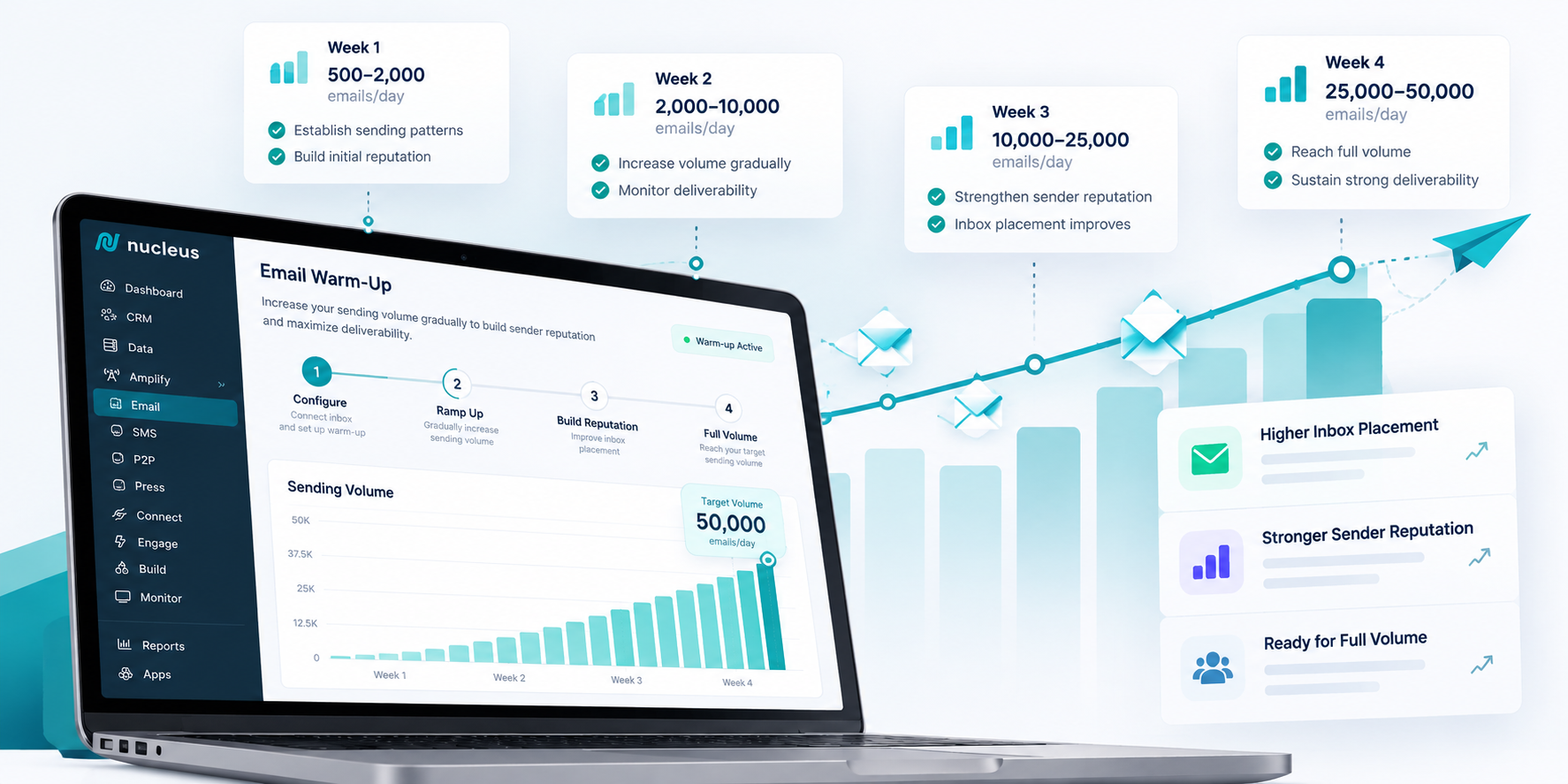
Plan on 4 to 6 weeks from first send to full volume. List size, target volume, and audience engagement all move that number.
What warm-up is
You start by sending small volumes from the new setup and raise them in steps, so mailbox providers get to know you before you send at full scale.
Reputation is judged mostly at the domain level now, based on your authentication setup, complaint rates, and sending history, rather than the IP address you send from.
A domain with no recent sending history is an unknown. When an unknown sender suddenly pushes out a huge volume, it looks like a spammer, even if the content is good and the list is clean. Warm-up gives providers a track record to look at: people open the mail, few addresses bounce, and almost nobody complains. That record is what gets you into the inbox at scale.
Two things to finish before warm-up starts
- Domain authentication. Add SPF, DKIM, and DMARC records to your domain's DNS. SPF lists the services allowed to send for you, DKIM signs each message so providers can confirm it came from you, and DMARC tells providers what to do with mail that fails those checks. The major providers require all three for bulk senders.
- List hygiene. Remove duplicates, suppress unsubscribes and past bounces, and flag invalid addresses. Warming up with a dirty list sends providers exactly the wrong signals.
Our team sets up both with you before your first send. Once we have DNS access and your list, it takes 1 to 2 business days.
Phase 1: Start with your most engaged contacts
DAYS 0 TO 5
The first sends go only to people likely to engage, usually anyone who opened or clicked in roughly the last 30 to 90 days. Opens, clicks, and replies this early are the strongest positive signals you can give a mailbox provider, and they set the baseline for everything that follows.
Volumes stay small on purpose. Day one is usually a few hundred emails, scaled to the size of your list.
Phase 2: Ramp up volume gradually
DAYS 5 TO 26 (ABOUT 3 WEEKS)
Once the early sends look good, volume goes up on a schedule. A common pattern is to roughly double every few sends, as long as the numbers stay healthy. The calendar is a guide, not a promise. The ramp moves forward when the signals are good and pauses when they aren't.
What we watch during this phase:
- Bounce rate: under 2%
- Spam complaint rate: under 0.3%, which is Google's published limit for bulk senders, and ideally under 0.1%
- Engagement: opens and clicks compared with your historical baseline
- Inbox placement signals, tracked through authentication reports and engagement data
If a metric slips, we hold volume where it is or step back for a few sends. A short pause costs you days. Pushing through a warning sign can cost you weeks.
Phase 3: Bring in less engaged segments
DAYS 26 TO 40 (ABOUT 2 WEEKS)
After your reputation is established with engaged contacts, we start adding segments that open less often. These contacts are more likely to bounce, ignore your mail, or mark it as spam. Bringing them in after trust is built lets your reputation absorb that risk.
This is also when we decide what to do with long-inactive contacts. Usually that means a re-engagement campaign or removing them. A slightly smaller list that people read will outperform a bigger one that mailbox providers treat as unwanted.
Phase 4: Full volume and steady state
AROUND WEEK 5 OR 6 AFTER FIRST SEND
Warm-up is done when your whole list is getting mail at normal volume and the metrics are stable. Reputation still needs upkeep after that. A sudden spike, like a holiday push at several times your usual volume, can still trip filters, so give those sends a ramp of their own.
Ongoing support from Nucleus. We keep monitoring bounce, complaint, and engagement trends, and your account team checks in regularly so we catch drift before it turns into a problem.
Shared vs. dedicated IPs
Your domain's authenticated identity carries more weight with inbox providers than which IP you send from, but the choice still shapes your setup:
- Shared IP. Your mail goes out from servers other senders use too, and those servers usually already have a track record. Your domain still needs its own warm-up regardless, since domain reputation doesn't carry over from the shared infrastructure.
- Dedicated IP. Servers used only by you, so you control that layer of reputation. It starts from zero and needs its own warm-up. We typically recommend it for very high-volume senders who want that control.
We determine your setup during onboarding, based on your volume.
Can we still send? And why rushing backfires
Yes, you can still send. Your most engaged audience gets email from phase 1 on, and only full volume to your full list has to wait. Many teams keep their previous platform running for the rest of the list during the transition so nobody goes without email. We help plan that overlap so the two platforms don't both send to the same contacts.
Rushing doesn't save time. It moves the delay to a worse moment. Sending too much too soon can get your mail throttled or delayed, push your best emails into spam (even for loyal subscribers), or get your sends blocked outright, which takes weeks of careful work to undo. A few extra weeks of warm-up up front costs far less than a damaged reputation in the middle of a campaign that matters.
Cold outreach warm-up looks different
Everything above assumes your list has emailed with you before, even from a different platform. Cold outreach starts from zero: the contacts have never heard from your domain, so warm-up has to build trust without that head start.
- A dedicated sending domain. Cold programs run from a subdomain or a separate domain built only for outbound, never your primary domain. If deliverability takes a hit, it stays contained instead of reaching your billing or product mail.
- A slower ramp. Cold warm-up typically starts around 5 emails per mailbox on day one and works up to 25 to 40 a day by around day 28, well below the Phase 2 volumes above, because there's no engagement history to lean on yet.
- Several mailboxes, not one. Running 3 to 5 mailboxes per domain spreads the load and keeps any single inbox inside a range providers treat as normal, commonly cited as 30 to 50 sends a day once an inbox is warmed. Pushing much past 100 a day per mailbox is what tends to trip filters.
- A higher bar on quality. Every bounce or complaint carries more weight against a domain with no track record, so verify addresses before the first send and write for a specific reader instead of a mail merge.
COLD EMAIL RAMP-UP PLAN (PER MAILBOX)
| WEEK | VOLUME PER MAILBOX/DAY | CONTACTS | WATCH |
|---|---|---|---|
| 1 (Days 1 to 7) | 5 to 15 | Best-fit prospects, verified and hand-checked | Replies and bounces, not opens |
| 2 (Days 8 to 14) | 15 to 25 | Same tight segment, expanded slightly | Bounce rate under 2% |
| 3 (Days 15 to 21) | 25 to 35 | Broader ICP segments added | Spam complaints under 0.3% |
| 4 (Days 22 to 28) | 35 to 40 | Full target segment | Reply rate holding steady |
| 5+ (steady state) | 30 to 50 | Full target segment, ongoing | All of the above, monitored weekly |
Per-mailbox limits, not per-domain. With 3 to 5 mailboxes running in parallel, a domain can reach roughly 90 to 250 sends a day by week 4 without any single inbox looking overworked. Hold volume flat, or drop back a step, whenever bounce or complaint rates move past the thresholds above; push forward only when they hold.
Cold email carries its own compliance rules. CAN-SPAM requires a working opt-out honored within 10 business days, clear identification of who's sending, and no misleading subject lines. Treat any reply asking to stop as an opt-out, even without a formal unsubscribe click.
We set up dedicated sending domains and mailbox rotation as part of onboarding for cold programs, and build the ramp around your target volume rather than an existing list's engagement.
Let's build your warm-up plan
Every warm-up depends on your list size, how engaged your audience is, and how much you plan to send, so the best way to set expectations is to plan it together. Talk to our team and we'll put together a warm-up and scaling plan for your list, with clear milestones, before you sign anything.
Warming up with Nucleus
| PHASE | WHAT HAPPENS | WHAT WE MONITOR | DURATION |
|---|---|---|---|
| 0. Prerequisites | Domain authentication (SPF, DKIM, DMARC) and list cleanup | Records verified, suppressions in place | 1 to 2 business days |
| 1. Engaged-first sends | Small sends to contacts who recently opened or clicked | Opens, clicks, bounces | Days 0 to 5 |
| 2. Gradual ramp | Volume roughly doubles every few sends while metrics stay healthy | Bounces (<2%), spam complaints (<0.3%, ideally <0.1%), domain and engagement signals | About 3 weeks |
| 3. Expand segments | Less engaged contacts added once trust is established; inactive contacts re-engaged or removed | Engagement by segment, complaints | About 2 weeks |
| 4. Full volume | Full list at normal volume, with ongoing monitoring | Reputation stays steady | From about week 5 or 6 |
WORTH KNOWING
- You aren't dark during warm-up. Engaged contacts get email from day one.
- The ramp follows your metrics, not the calendar. We pause if signals slip, which protects inbox placement.
- Domain reputation matters more than the IP you send from.
- Cold outreach needs its own, slower ramp and a dedicated sending domain, since there's no engagement history to build on.
- Rushing backfires. A reputation damaged by sending too fast can take weeks to repair.
Operations
Political
Reputation
Why Campaign Nucleus Is the Better Choice for Political Campaigns
April 29, 2026
Political campaigns don’t have time for disconnected systems, clunky workflows, or software that only solves one part of the job.
A lot of political campaign software forces teams to piece together multiple tools just to manage basic operations—one for CRM, one for email, one for events, one for landing pages, one for automations, and another to try to make sense of the data after the fact.
That’s not efficient, and it’s definitely not built for the pace of a real campaign.
Campaign Nucleus brings it all together in one connected platform.
From supporter data and outreach to websites, events, automations, and reporting, Nucleus is built to help campaigns move faster, stay organized, and operate from a single source of truth.
Built for Real Campaign Operations
Campaign Nucleus gives political campaigns the tools to actually run the full operation—not just one slice of it.
That includes:
• CRM and supporter profiles • email and outreach • websites and landing pages • event registration and management • automations and follow-up • audience segmentation • reporting and analytics
Instead of stitching together disconnected tools, your team can manage communications, engagement, and campaign activity in one place.
That means less manual work, cleaner data, and a much better workflow across the board.
Better Than the Typical Political Tech Stack
A lot of organizations don’t realize they’re not actually comparing one platform to another—they’re comparing one connected system to a stack of tools that were never really designed to work together.
That’s where Campaign Nucleus stands apart.
Instead of relying on multiple disconnected vendors to manage your campaign, Nucleus gives your team one platform built to support the full operation—from outreach and websites to events, data, and automation.
How Campaign Nucleus Compares
Feature / Capability | Campaign Nucleus | Salesforce | NationBuilder | Eventbrite | Bloomerang | GoHighLevel |
CRM / Supporter Profiles | ✔️ Built-in | ✔️ Yes | ✔️ Yes | ❌ No | ✔️ Yes | ✔️ Yes |
Email & Outreach | ✔️ Native | ⚠️ Add-ons | ✔️ Yes | ❌ No | ✔️ Basic | ✔️ Yes |
Websites & Landing Pages | ✔️ Built-in | ⚠️Custom | ✔️ Limited | ❌ No | ❌ No | ✔️ Yes |
Event Management | ✔️Advanced | ⚠️ Add-ons | ⚠️ Limited | ✔️ Yes | ⚠️ Limited | ⚠️ Basic |
Event Check-In / Credentialing | ✔️ Yes | ❌ No | ❌ No | ⚠️ Basic | ❌ No | ❌ No |
Automation | ✔️ Built-in | ✔️ Yes | ⚠️ Limited | ❌ No | ✔️ Basic | ✔️ Yes |
Audience Segmentation | ✔️Advanced | ✔️ Yes | ✔️ Yes | ❌ No | ✔️ Yes | ✔️ Yes |
Data Activation | ✔️ Yes | ⚠️Complex | ⚠️ Limited | ❌ No | ⚠️ Limited | ⚠️ Limited |
Campaign-Specific Features | ✔️ Built for campaigns | ❌ No | ✔️ Partial | ❌ No | ❌ No | ❌ No |
All-in-One Platform | ✔️ Yes | ❌ No | ⚠️ Partial | ❌ No | ❌ No | ⚠️ Partial |
One Platform. Better Execution.
Campaign Nucleus helps campaigns simplify their tech stack and operate more effectively across the full campaign lifecycle.
Instead of bouncing between disconnected systems, your team gets one platform built to support:
• smarter outreach • cleaner data • stronger event execution • faster launches • more connected operations
That’s what makes Nucleus more than just another political campaign software option.
It’s what makes it the better one.
Ready for a Better Political Campaign Platform?
If your current setup feels fragmented, limited, or like it’s creating more work than it should, it’s probably time for something better.
Campaign Nucleus gives political campaigns a more connected, more capable, and more scalable way to operate.

Emails
Reputation
Only Time Will Tell (Or) Time Heals all Wounds (Domains)
November 21, 2024
A tale of how hard work (eventually) pays off
By Julia, Deliverability Expert
When we are in a court of law, we are hopefully paying regards to the phrase “innocent until proven guilty.”
Well… when it comes to servers responding to your sending domains and IPs, it is quite the opposite. You must prove your domain to be worthy of delivering to your recipients without an existing precedent… sometimes before you can effectively deliver at all.
Now that the campaigning cycle is coming to another end, this is a great opportunity to work toward preparing your domains and IPs for the most success when the cycle begins picking up again. I think the most important take-away here is: PREPARE your sending domain BEFORE YOU NEED to send with it.
I want to take a few minutes to review how pre-emptively preparing your sending domains can be beneficial to you in months to come.
It takes TIME to scale your domain up to your full sending volume. By getting an early start you are able to avoid rushing the warming process, which could cause you to have blocks and trouble with deliverability.
Even after you’ve scaled to full sending volume, it takes TIME for a server to trust you. Servers are constantly watching how their recipients are engaging with your emails & designated a reputation to your domain/IP based off that response. The only way to continuously improve your reputation, especially on Google and similar servers, is for your audience to be consistently positively engaging with your emails. This means the same users repeatedly engaging with your emails, so sending to only new recipients constantly is actually very poor practice.
And it takes TIME for your audience to recognize and engage with your content. This is a great opportunity to focus less on ads and asks, and more on branding and informational content. It can be extremely valuable to produce very non-controversial content that includes little to no ‘call to actions.’ This type of content generally performs much better in the eyes of the server so it can help you to build your reputation up a bit so you have a buffer when you do want to send more hard-hitting content.
Many of the questions I regularly receive are concerning how quickly we can fully scale a domain & the truth is… there are so many things at play when you are preparing a new domain/IP for sending that the best thing you can do is get a head start. There are very few issues I’ve seen not be able to solved with a little time and persistence.
For more information be sure to contact our team for training or insight and visit your Nucleus Resource Library!
OR
Want to get on the platform that sent 6 BILLION emails in the last 90 days leading up to Election Day? Click here!

Agency
Emails
Reputation
Planting Your Seed (List): Blossoming your Reputation
September 19, 2024
By Julia, Deliverability Expert
Have you ever heard the term “seed list” used? Well… we’ve been using this term a lot over here at Campaign Nucleus & we are excited to introduce seed list usability as one of our newest in-platform features.
So, firstly, what is a seed list? This is a list of emails that you have internal access to in order to be on the receiving end of your email sends.
Our email team has found that generally seed lists are not a great representation of inbox placement – this is because, after a few sends, the inbox will start to replicate personalized behavior rather than that of other inboxes with the same server. With that in mind, our team has found a lot of value in using email lists comprised of internal team members to help kickstart our email engagement with new or struggling domains/IPs.
Team members can be instructed to positively engage with these emails. In doing so, we can begin building up a good domain reputation from the very first day of sending so that we are able to find more success with deliverability and inbox placement.
For instructions on how to enable this feature in your tenant, please visit your Nucleus Resource Library!
OR
To experience these features yourself, click here!